
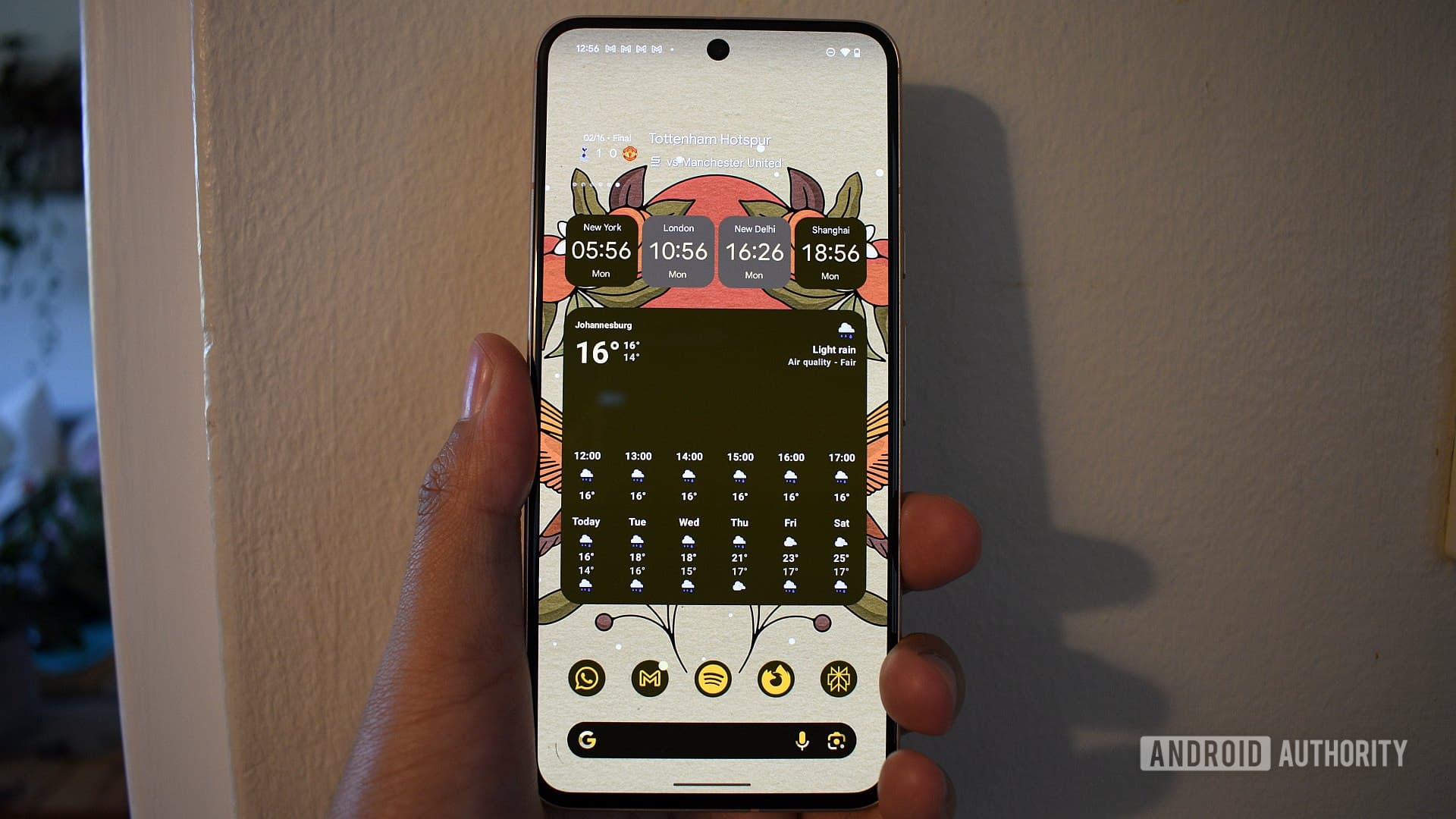
Android Widgets Are Still Alive — and More Useful Than Ever
In an era where apps are sleeker, smarter, and more capable than ever, it might be tempting to dismiss the humble Android widget as a relic of the early smartphone age. But if you spend any time in Android enthusiast communities, you will quickly discover that widgets are far from dead. In fact, for millions of users around the world, one specific widget is so integral to their daily routine that removing it from their home screen feels unthinkable.
A recent survey asked Android users a deceptively simple question: what is the one Android widget you simply cannot live without? The responses were illuminating, revealing just how deeply these small, interactive home screen panels are woven into how people manage their lives. Whether it is checking the weather at a glance, tracking fitness goals, or staying on top of a packed calendar, widgets continue to serve a purpose that no app icon alone can replicate.
Why Android Widgets Still Matter in 2025
Before diving into the survey results, it is worth pausing to understand why widgets remain so compelling in 2025. Unlike iOS, which only introduced widgets relatively recently, Android has supported them for well over a decade. That long history has given developers and users alike plenty of time to refine how widgets work, what information they surface, and how they integrate with the broader Android ecosystem.
The core appeal of a widget is immediacy. Instead of unlocking your phone, finding an app, waiting for it to load, and then locating the specific piece of information you need, a widget puts that data right on your home screen the moment you wake your device. For time-sensitive information — weather, calendar appointments, breaking news, fitness metrics — this is genuinely transformative for day-to-day efficiency.
Beyond raw practicality, widgets also serve as a form of personal expression. The way a user arranges their home screen, which widgets they choose to display, and how much real estate they devote to each one says a great deal about their priorities and workflow. Some users, like dedicated Android power users, once ran home screens packed with dozens of widgets covering everything from word-of-the-day displays to sunrise and sunset timers. Others prefer a minimalist approach, keeping just one or two high-value widgets front and center.
What the Survey Revealed: The Most Essential Android Widget
When the results were tallied, one category rose to the top with remarkable consistency: the weather widget. Across age groups, regions, and Android device types, users cited a live weather widget as the single tool they rely on most heavily every single day. It is not hard to see why. A well-designed weather widget tells you in a single glance whether to grab an umbrella, how to dress for the morning commute, and what the afternoon holds in store — all without opening a single app.
Popular choices among respondents included widgets from apps like Google Weather, Weather Channel, and third-party favorites such as Weather Widget Infinite and 1Weather. Users particularly valued widgets that showed hourly forecasts, precipitation probability, and real-feel temperatures, rather than just a single static number.
Coming in close behind weather widgets was the calendar widget, which makes intuitive sense. For professionals juggling meetings, deadlines, and personal appointments, having the next several days of your schedule visible at a glance on your home screen removes significant cognitive load. Google Calendar's widget, in particular, was frequently mentioned for its clean design and seamless integration with other Google services.
Other Widgets Android Users Swear By
While weather and calendar dominated the responses, the survey also surfaced some interesting and less obvious contenders that reflect the diversity of how Android users interact with their devices.
- Google Maps or navigation widgets were cited by commuters and frequent travelers who want to check real-time traffic conditions or pull up a saved route without any friction. Some users specifically mentioned a colleague's home screen setup that featured the Google Maps widget alongside Brave Browser and Gemini as part of a tightly curated productivity layout.
- Music and media control widgets were popular among users who listen to podcasts, audiobooks, or music throughout the day. Being able to pause, skip, or adjust volume directly from the home screen rather than dropping into an app mid-task was highlighted as a major quality-of-life improvement.
- To-do list and task management widgets, particularly from apps like Todoist, TickTick, and Google Tasks, made a strong showing among productivity-focused respondents who want their most pressing tasks always in view.
- Battery and system monitor widgets appealed to power users who keep close tabs on device performance, charging status, and storage usage at a glance.
- Countdown timer widgets and niche tools like history lesson widgets or word-of-the-day panels demonstrated that for a vocal subset of Android enthusiasts, the home screen is as much a learning tool as a productivity dashboard.
Minimalism vs. Widget Abundance: Two Valid Philosophies
One of the more interesting tensions the survey exposed is the divide between widget maximalists and minimalists. Some users lean into the full potential of Android's widget system, loading their home screen with information panels from edge to edge. Others have moved toward stripped-back setups — sometimes driven by switching to alternative launchers like AIO Launcher, which surfaces contextual information dynamically without requiring individual widgets to be placed manually.
Neither approach is objectively superior. The right setup depends entirely on your workflow, the kind of information you need at arm's reach, and how much visual complexity you find helpful versus distracting. What the survey made abundantly clear, however, is that even users who have pared back their widget use tend to keep at least one — and for most, that one is weather.
How to Choose the Right Widget for Your Android Home Screen
If you are looking to optimize your own Android setup, a few guiding principles can help you decide which widgets deserve a permanent spot on your home screen.
First, focus on information you check multiple times per day. If you find yourself opening the same app repeatedly throughout the day, that app's widget is almost certainly worth the screen real estate. Second, prioritize widgets that offer genuine interactivity, not just static displays. The best widgets let you take action — mark a task complete, start navigation, play a track — without ever leaving your home screen. Third, be honest about clutter. A home screen crammed with widgets that you rarely glance at is no more useful than one with nothing on it. Less is often more.
Finally, do not be afraid to experiment. Android's widget ecosystem is vast, and the perfect combination for your lifestyle might take a little trial and error to discover. But once you find it, you will wonder how you ever managed without it — just like the thousands of survey respondents who could not imagine starting their day without a single, trusted widget waiting for them on their home screen.