
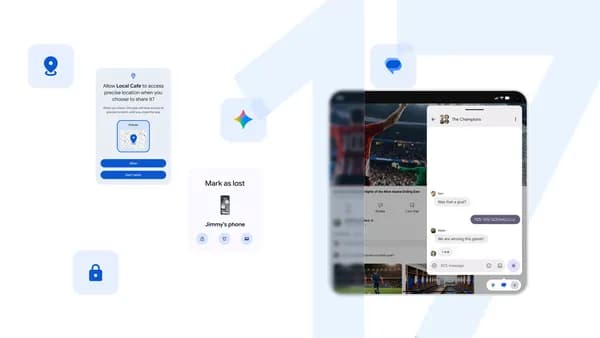
Android 17 Is Here: Everything You Need to Know
Google has officially pulled back the curtain on Android 17, and the latest iteration of the world's most widely used mobile operating system is shaping up to be one of the most meaningful upgrades in recent memory. Whether you're a power user who lives inside productivity apps, a mobile gamer pushing your device to its limits, or someone who simply wants a safer and more private smartphone experience, Android 17 has something substantial to offer. Let's take a deep dive into what's new, what's improved, and why this update matters for millions of Android users around the globe.
Enhanced Productivity: Getting More Done on Your Android Device
One of the headline areas of Android 17 is a sweeping set of improvements to everyday productivity. Google has clearly been listening to how people actually use their phones — not just for communication, but as full-fledged work and creative tools — and the result is a smarter, more responsive Android experience designed to reduce friction and keep you in flow.
Smarter Multitasking and App Management
Android 17 introduces refined multitasking capabilities that make switching between apps faster and more intuitive than ever before. The improved split-screen mode now adapts more intelligently to the content you're working with, making it easier to reference a document while drafting a reply or monitor a dashboard while taking notes. App pairs can be saved and recalled instantly, meaning your most-used combinations are just a tap away.
Notification management has also received a thoughtful overhaul. Smarter grouping and priority filtering mean your lock screen and notification shade surface the alerts that genuinely need your attention, while routine or low-priority notifications are neatly organized without cluttering your experience. For professionals who receive dozens of notifications an hour, this alone can be a game changer.
Improved Integration With Google Workspace and Productivity Apps
Android 17 deepens the connection between your phone and Google's suite of productivity tools. Tighter integration with Google Docs, Sheets, Drive, and Calendar means actions that previously required multiple steps now feel seamless. Contextual suggestions powered by on-device intelligence help you draft responses, surface relevant files, and stay on top of your schedule without bouncing between apps.
Third-party productivity apps also benefit from new Android 17 APIs that allow for richer, more consistent experiences. Developers can now build tighter widgets, more responsive quick-action shortcuts, and smarter home screen interactions that put your most important tools front and center.
Gaming on Android 17: A Console-Class Experience in Your Pocket
Mobile gaming has evolved dramatically, and Android 17 takes another significant leap forward in delivering the kind of performance, visual fidelity, and responsiveness that modern gamers demand. Google has worked closely with chipset partners and game developers to ensure that Android 17 unlocks new possibilities at every level of the gaming ecosystem.
Performance and Frame Rate Improvements
Android 17 brings optimized game performance through improved thermal management and more efficient resource allocation. Games that previously struggled to maintain consistent frame rates on mid-range devices now run noticeably smoother, thanks to backend improvements in how Android 17 handles CPU and GPU workloads during extended sessions. High refresh rate support has also been expanded, ensuring that compatible games and displays work together more reliably out of the box.
Game Dashboard and Player Tools
The refreshed Game Dashboard in Android 17 gives players a centralized hub for managing their gaming experience without leaving the game. Tools for screen recording, frame rate monitoring, do-not-disturb controls, and performance modes are all accessible through a clean, unobtrusive overlay. These features put players in control of how their device performs under pressure, whether they're grinding through a competitive session or exploring an open world.
Android 17 also introduces improvements to haptic feedback precision for gaming, allowing developers to craft more nuanced tactile responses that make every interaction feel more grounded and immersive. Combined with audio enhancements that make spatial sound more accurate on supported hardware, the overall gaming experience on Android 17 is a clear step forward.
Security and Privacy: Protecting What Matters Most
In a world where digital threats are increasingly sophisticated, Android 17 raises the bar for mobile security and privacy in meaningful ways. Google has long positioned Android's security model as one of its core strengths, and Android 17 builds on that foundation with both visible features and behind-the-scenes protections users may never notice — but will absolutely benefit from.
Stronger App Permissions and Transparency
Android 17 expands the granularity of app permissions, giving users more precise control over what data and hardware each app can access. New permission categories and clearer on-screen explanations make it easier to understand exactly what you're granting when an app requests access to your location, camera, microphone, or contacts. A redesigned Privacy Dashboard surfaces this information in a more digestible format, so you can audit your apps' behavior at a glance.
Enhanced Threat Detection and Safe Browsing
Under the hood, Android 17 includes improved on-device threat detection that can identify suspicious app behavior without sending data to external servers. This privacy-preserving approach to security means your device can flag potential risks faster and with less exposure of your personal data. Enhanced integration with Google Play Protect further strengthens real-time scanning of newly installed apps and updates.
What Android 17 Means for the Future of Mobile
Android 17 is more than a feature drop — it reflects Google's evolving vision for what a mobile operating system should be in an era defined by AI, always-on connectivity, and increasingly blurred lines between personal and professional life. The improvements to productivity, gaming, and security are not isolated upgrades; they are part of a coherent platform strategy designed to make Android devices more capable, more trustworthy, and more enjoyable to use every single day.
- Smarter multitasking and notification management streamline everyday workflows.
- Deeper Google Workspace integration helps professionals stay productive on the go.
- Optimized gaming performance and a refined Game Dashboard elevate mobile play.
- Expanded privacy controls and on-device threat detection provide stronger protection.
- New developer APIs unlock richer experiences across apps, games, and widgets.
As Android 17 rolls out across eligible devices, users can look forward to an experience that feels both meaningfully improved and immediately familiar. Whether you're upgrading from Android 16 or coming to Android fresh, version 17 makes a compelling case that the best Android yet is the one you're about to install. Keep an eye on your device's update settings and be ready to explore everything this landmark release has to offer.