
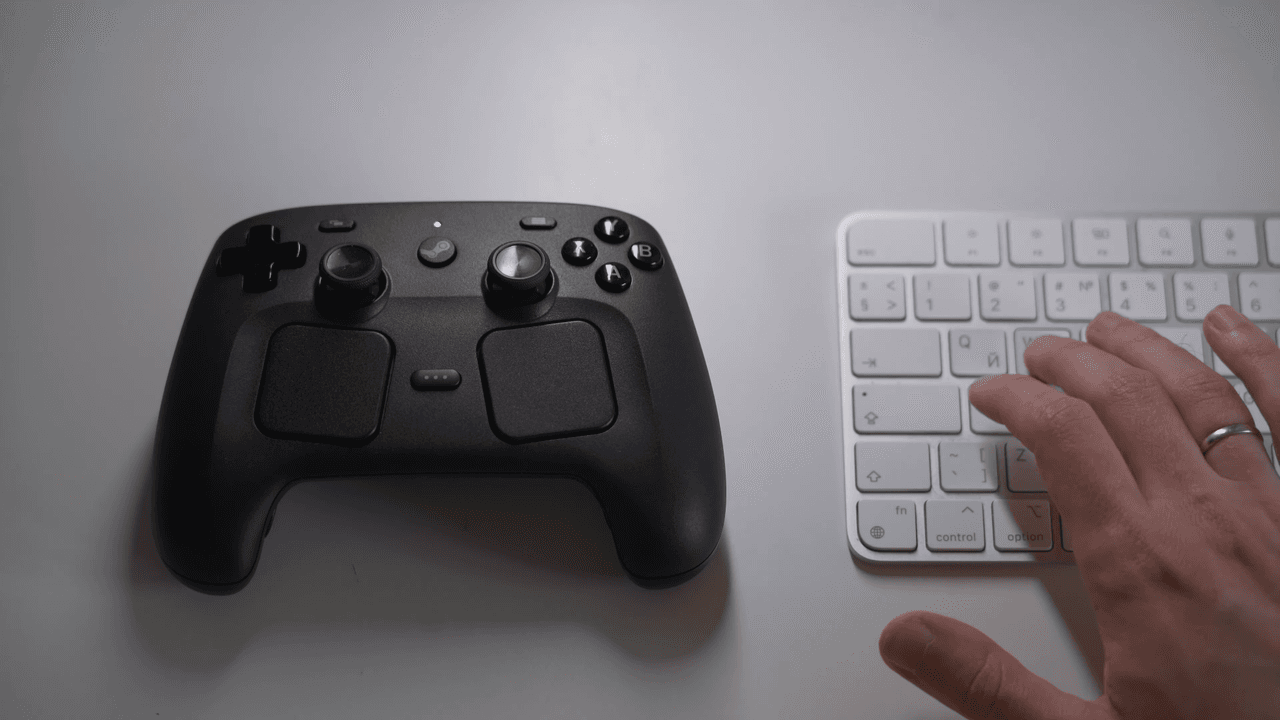
A Wild New Web App Turns Your Steam Controller Into a Tiny RC Car
Gaming peripherals are designed to stay in your hands — but what if one of them could take on a life of its own and cruise across your desk without any human guidance? That is precisely what a new web app has made possible with Valve's cult-classic Steam Controller. By cleverly exploiting the device's built-in rumble motors, the application can propel the gamepad across flat surfaces in a manner that resembles a remote-controlled car. It is a quirky, imaginative, and surprisingly functional hack that has caught the attention of tech enthusiasts and retro gaming fans alike.
What Is the Steam Controller, and Why Does It Matter Here?
Valve released the Steam Controller back in 2015 as a bold attempt to bridge the gap between traditional gamepads and keyboard-and-mouse setups. It featured two large trackpads instead of a conventional right analog stick, a gyroscope for motion input, and — crucially for this story — dual linear resonant actuators (LRAs) rather than the standard eccentric rotating mass (ERM) motors found in most controllers. These LRAs are far more precise than typical rumble motors, capable of delivering nuanced haptic feedback with adjustable frequency and amplitude. Valve used this to simulate everything from the texture of gravel under virtual tires to the recoil of a gun. The Steam Controller was discontinued in 2019, but it remains beloved by a dedicated community and is still widely available on the secondhand market.
Those highly precise haptic motors, it turns out, are exactly what makes the RC car trick possible. Standard rumble motors spin an unbalanced weight to generate vibration, making it very difficult to control direction. The Steam Controller's LRAs, however, can be fired independently and at specific intensities, giving creative developers a mechanism to generate directional force rather than just random shaking.
How the Web App Actually Works
The web application leverages the browser-based Gamepad API, a standard web interface that allows websites to read input from connected game controllers. Most people know the Gamepad API for reading button presses and stick movements, but the API also exposes rumble actuators through its hapticActuators interface. This is the entry point the developer used to gain granular control over the Steam Controller's dual LRAs.
By firing each haptic motor at carefully calculated intensities and timings, the app can generate movement in specific directions. Because the two actuators are positioned side by side within the controller's body, sending different levels of force to each one creates an asymmetrical vibration that nudges the controller in a chosen direction. Think of it like a differential drive system — the same basic principle used in actual RC cars and robots, where two independent motors are varied in speed to steer.
The result, as demonstrated in videos shared by the app's creator, is a Steam Controller that scoots and turns across a smooth desk surface with genuine responsiveness to user input. You can steer it left, right, forward, and essentially navigate it around obstacles, all from the same browser interface that is controlling the haptic motors. It is not fast, and it does not handle carpet, but on a hard, flat surface, the effect is genuinely impressive and more than a little amusing.
Why This Is More Than Just a Gimmick
On the surface, watching a gamepad shuffle around a desk like a confused tortoise sounds like pure novelty — and to some extent, it is. But the project highlights several genuinely interesting points about hardware, software, and the untapped potential of devices we already own.
- The Web Gamepad API is more powerful than most people realize. Developers rarely push the haptic output capabilities of the API to its limits, and this project is a compelling demonstration of what is possible without any native drivers or custom software.
- The Steam Controller's hardware remains uniquely capable. Years after its discontinuation, Valve's peripheral is still inspiring novel uses precisely because its LRAs are more sophisticated than what you find in contemporary controllers from Sony or Microsoft.
- It opens doors for accessibility and robotics experimentation. The underlying technique — using vibration actuators as directional motors — has real-world applications in small robotics platforms, tactile interfaces, and low-cost haptic navigation devices.
- Community-driven ingenuity keeps old hardware relevant. Projects like this demonstrate why enthusiast communities matter. Discontinued hardware can keep finding new purpose when curious developers continue to experiment with it.
Can You Try It Yourself?
Because the application runs entirely in the browser using standard web APIs, you do not need to install any special software, drivers, or plugins beyond what is already on your machine. You simply need a Steam Controller connected via USB or its wireless dongle, a compatible browser such as Google Chrome or Microsoft Edge (both of which have strong Gamepad API support), and a smooth flat surface for the controller to operate on. Firefox users may encounter limitations, as its Gamepad API haptic implementation has historically lagged behind Chromium-based browsers.
Once connected, the web app interface lets you use keyboard inputs or another connected gamepad to send directional commands, translating those inputs into coordinated motor pulses that drive the Steam Controller around. The developer has reportedly made the project open source, so tinkerers can examine the code, fork it, and build their own variations.
The Broader Takeaway for Tech and Gaming Communities
This project is a small but delightful reminder that the hardware sitting in a drawer or listed on eBay for twenty dollars can still surprise us. Valve built the Steam Controller with unusually capable internals, and even years after its commercial failure and discontinuation, creative individuals continue to find new expressions for that engineering investment. Whether you see it as a fun party trick, a fascinating technical demo, or a jumping-off point for your own browser-based robotics experiments, the Steam Controller RC car web app earns its moment in the spotlight.
If you still own a Steam Controller — or pick one up cheaply secondhand after reading this — it might be worth plugging it in, pointing your browser at the app, and watching your old gamepad take an unexpected little road trip across your desk.