
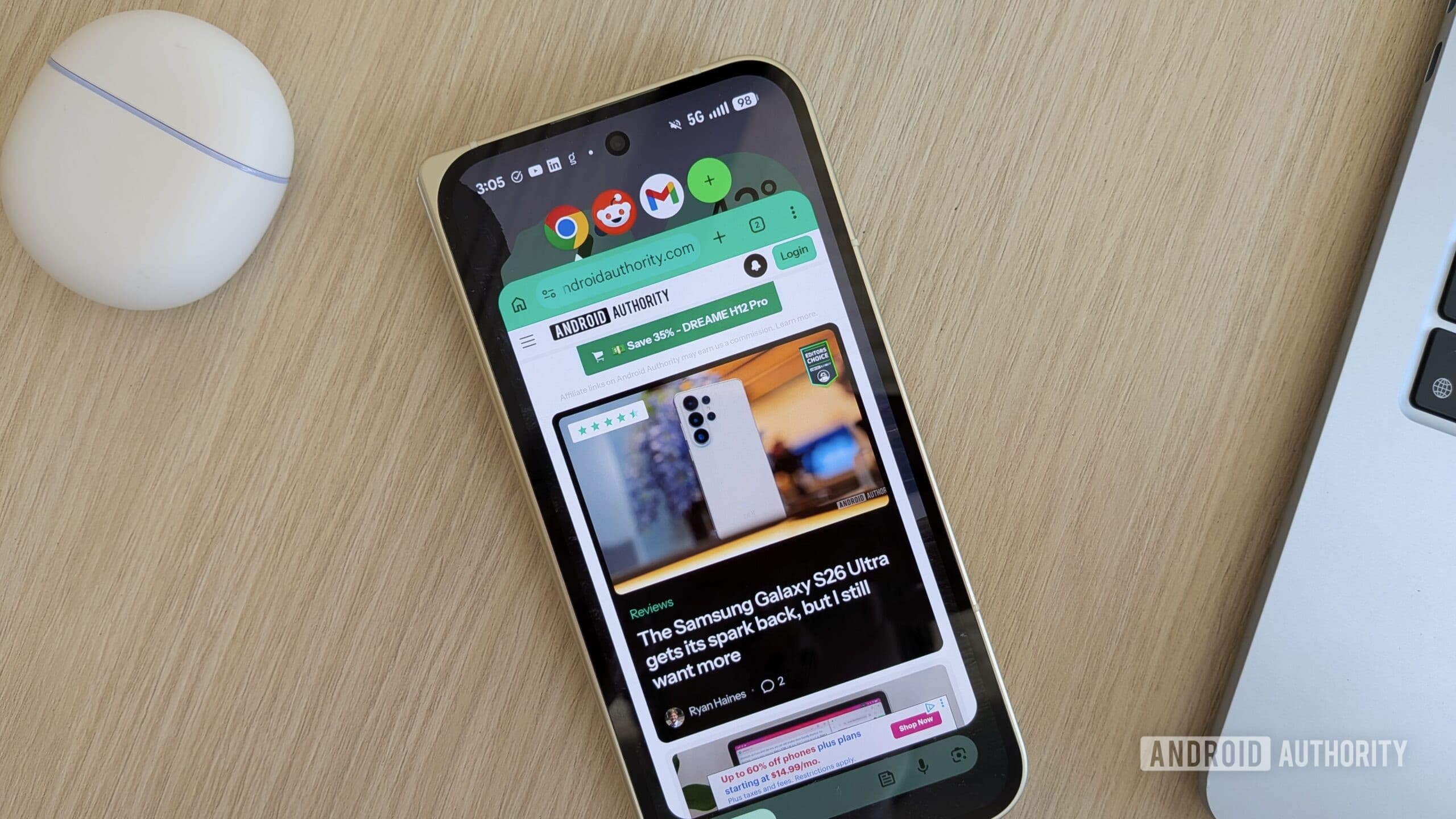
Android 17's Bubbles Feature Is Transforming Multitasking on Pixel Phones
If you've ever wished you could juggle multiple apps on your smartphone without the constant back-and-forth of switching between screens, Google has finally delivered the answer. With the arrival of the June Pixel Drop, Android 17 introduces a powerful new multitasking feature called Bubbles — and it's already changing the way Pixel users interact with their devices. Whether you're replying to a message while browsing the web, referencing a recipe while watching a video, or monitoring a live score while scrolling through social media, Bubbles makes it all feel effortless.
What Is the June Pixel Drop?
For those unfamiliar with the term, the Pixel Drop is Google's way of delivering meaningful software updates and new features to its Pixel lineup outside of major Android releases. These monthly or seasonal drops often include camera improvements, accessibility enhancements, new UI tweaks, and occasionally, headline-worthy features that significantly improve the Pixel experience.
The June Pixel Drop is one of the more exciting ones in recent memory, primarily because of the introduction of Bubbles — a feature that brings a whole new dimension to how users can multitask on Android. Google has clearly been paying attention to how people use their phones in the real world, and Bubbles feels like a direct response to that research.
How Do Bubbles Work on Android 17?
The concept behind Bubbles is both simple and intuitive. To get started, all you need to do is long-press any app icon on your home screen or app drawer. This action prompts the app to open in a small floating window that hovers over whatever you're currently doing on your device. The floating window is interactive, meaning you can use the app just as you normally would, without being taken away from your primary screen.
Once you tap outside of the floating window, the app automatically minimizes itself into a compact, circular bubble that sits on the edge of your screen. From there, it stays out of your way until you need it. A quick tap on the bubble brings the app back into its floating window state, allowing you to pick up right where you left off. It's clean, fast, and surprisingly satisfying to use.
Opening Multiple Bubbles at Once
One of the most powerful aspects of this feature is that it doesn't limit you to just one floating app. Android 17's Bubbles allows users to have up to five apps open in bubble form simultaneously. That means you could, for example, have a messaging app, a calculator, a music streaming service, a note-taking app, and a navigation tool all floating and ready to access at any moment — all while keeping your main app front and center. This level of flexibility is a significant leap forward for Android multitasking and puts Pixel devices in an exciting new category of productivity-focused smartphones.
Which Pixel Devices Support Bubbles?
Google has made the Bubbles feature available across all Pixel devices that are running Android 17. This means you don't need to own the latest flagship Pixel to take advantage of the feature. Whether you're using a Pixel 6, Pixel 7, Pixel 8, or the newest models in the Pixel 9 series, as long as your device has been updated to Android 17, you should have access to Bubbles. This wide rollout reflects Google's commitment to delivering meaningful software experiences across its entire supported device ecosystem, not just at the high end.
If you haven't already updated your Pixel to Android 17, now is a great time to do so. Head to Settings > System > Software Update to check whether the latest version is available for your device.
Why Bubbles Matter for Android Users
The introduction of Bubbles isn't just a novelty — it addresses a genuine pain point that smartphone users have faced for years. Traditional multitasking on Android has often involved switching between full-screen apps, using split-screen mode (which can feel cramped on smaller displays), or relying on picture-in-picture functionality that is limited to specific use cases like video playback.
Bubbles offer something different: a lightweight, flexible, and non-intrusive way to keep multiple apps accessible without cluttering your screen or losing your place in whatever you're primarily doing. For power users, this is a game-changer. For casual users, it's a feature that will quietly improve daily workflows without requiring a learning curve.
Real-World Use Cases for Bubbles
- Messaging while browsing: Keep a chat app bubbled while you research something online, and reply without ever leaving your browser.
- Cooking and referencing: Follow a recipe in a bubbled browser tab while streaming music or a podcast in another.
- Work productivity: Bubble a calculator or note-taking app while working through a document or spreadsheet.
- Entertainment and social: Keep a sports update app bubbled while scrolling through your social media feed.
- Navigation and communication: Have maps bubbled alongside a messaging app when coordinating meetups on the go.
How Bubbles Fit Into the Broader Android 17 Vision
Android 17 represents a maturation of the Android platform, and Bubbles is one of several features that signal Google's deeper focus on usability and productivity. The operating system has long been praised for its flexibility and customization options, but Bubbles takes that ethos further by giving users a genuinely new and practical way to interact with their apps.
The feature also feels like a natural evolution of the notification bubbles that were introduced in earlier Android versions for messaging apps. By expanding the concept to all apps and giving users direct control through a long-press gesture, Google has turned what was once a limited notification tool into a full-fledged multitasking system.
Getting the Most Out of Android 17's Bubbles
To make the most of the Bubbles feature, it helps to think about which apps you reach for most frequently throughout the day. Pinning your most-used tools as bubbles — whether that's a messaging app, a quick-access browser, or a productivity tool — means they'll always be a single tap away, no matter what you're doing. Over time, this small habit can meaningfully reduce the friction in your daily digital routine.
It's also worth exploring how Bubbles interacts with your other Android 17 features, such as gesture navigation and split-screen mode, to build a multitasking setup that works best for your personal workflow.
Final Thoughts
The June Pixel Drop's Bubbles feature is one of those updates that sounds simple on paper but genuinely reshapes how you use your phone once it's in your hands. By allowing up to five apps to float as interactive bubbles over any screen, Android 17 gives Pixel users a smarter, more fluid approach to multitasking. It's available on all Pixel devices running Android 17, making it one of the most widely accessible improvements in this drop. If you haven't tried it yet, update your device and give it a go — chances are, you won't want to go back to the old way of doing things.