
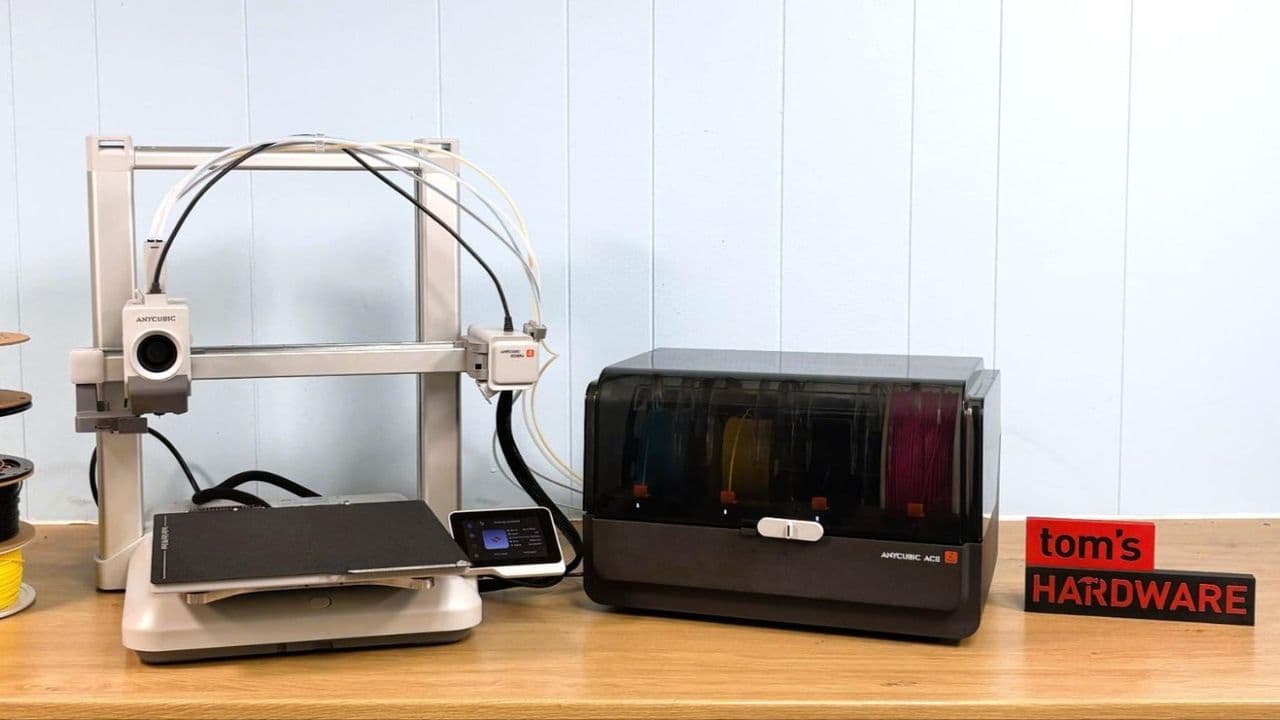
Anycubic Kobra 4 Combo Review: A Solid Printer That Plays It Safe
The 3D printing market moves fast, and Anycubic has been one of its most prolific players. With the release of the Anycubic Kobra 4 Combo in May 2026, the company returns with an updated take on its popular Kobra 3 Combo — a machine that promises improved multimaterial printing, a refined design, and budget-friendly pricing. But does it bring enough to the table to stand out in an increasingly competitive space? Let's take a deep dive into everything this printer offers and whether it deserves a spot in your workshop.
What Is the Anycubic Kobra 4 Combo?
The Kobra 4 Combo is best understood as a successor to the 2024 Kobra 3 Combo, though it could also be seen as a more compact version of the larger Kobra 3 Max. Either way, it represents a meaningful — if not groundbreaking — step forward for Anycubic's mid-range lineup.
Design-wise, the Kobra 4 borrows visual cues from some of the biggest names in the industry. Its brushed aluminum frame and pale plastic base have drawn immediate comparisons to Bambu Lab's A1 series, giving it a premium look that belies its budget price point. Whether you view that as inspired or imitative, the result is a machine that looks the part on any desk or workbench.
Key Specifications at a Glance
Before diving into the performance details, here's a quick overview of what the Kobra 4 Combo brings in terms of hardware:
- Build Volume: 260 x 260 x 260 mm — a generous cube that gives you plenty of room for large single prints or batches of smaller objects.
- Supported Materials: PLA, PETG, and TPU, with a maximum nozzle temperature of 300°C.
- Extruder Type: Direct drive, which is ideal for flexible filaments like TPU.
- Nozzle Size: 0.4mm standard.
- Build Platform: Double-sided PEI spring steel flex plate, making print removal clean and effortless.
- Bed Leveling: Automatic with Auto Z Offset.
- Connectivity: USB, LAN, Wi-Fi, and a dedicated app.
- Interface: 3.5-inch color touchscreen.
- Machine Footprint: 455.4 x 445.3 x 461.3mm (not including spool holder).
- Machine Weight: 9.9kg (21.82 lbs).
- MSRP: $499, with frequent sale pricing around $379 for the combo and $279 for the single-color version.
Print Quality and Performance
On the printing side, the Kobra 4 Combo delivers a noticeably improved experience compared to its predecessor. The automatic bed leveling works reliably, and the vibration compensation — now essentially a standard feature in modern 3D printers — helps maintain print quality even at higher speeds. The result is clean, consistent output that beginner users will find encouraging and intermediate users will find more than adequate.
The quick-swap hotend, first introduced on the Kobra X, makes a welcome return here. This feature allows users to change nozzles with minimal fuss, reducing downtime between print jobs or when switching materials. It's a practical addition that speaks to Anycubic's focus on ease of use.
The double-sided PEI spring steel flex plate performs excellently, providing strong adhesion during printing and easy part removal once the plate cools. For beginners who have struggled with prints refusing to release or sticking unevenly, this alone is a significant quality-of-life improvement.
The ACE Pro 2: The Real Star of the Show
If the Kobra 4's print quality is solid but familiar, the ACE Pro 2 multimaterial handler is where most of the meaningful innovation lives. This updated system manages filament switching for multicolor and multimaterial prints, and it does so with improved reliability over its predecessor.
One standout feature is the ACE Pro 2's ability to double as a filament dryer. This is particularly useful for moisture-sensitive materials like PETG, which can suffer from stringing, bubbling, and poor layer adhesion when the filament hasn't been properly dried. Having a built-in drying function removes a common friction point for users who would otherwise need a separate drying unit.
That said, the multimaterial system does add bulk to the machine. Compared to the Kobra X's elegantly integrated filament switcher — which is built directly into the tool head — the Kobra 4 Combo's setup feels more unwieldy. Filament paths are less clean, and the overall footprint is larger, which may be a consideration for users with limited workspace.
How Does It Compare to the Kobra X?
This is perhaps the most important question for anyone considering the Kobra 4 Combo. The Anycubic Kobra X, reviewed earlier in 2026, currently holds the title of best budget 3D printer in Anycubic's lineup — and for good reason. At the same $379 sale price, the Kobra X offers a four-color multimaterial system built into the tool head, a slimmer footprint, and cleaner filament management.
The Kobra 4 Combo matches the Kobra X on print quality and shares several core features, including the quick-swap hotend. But where it falls short is in the elegance of its multimaterial solution and overall compactness. The Kobra X represented a true leap forward in accessible multicolor printing; the Kobra 4 Combo feels more like a refinement of an older approach.
As a result, the Kobra 4 Combo has not displaced the Kobra X from the Best 3D Printers of 2026 list. It simply doesn't offer a compelling enough reason to choose it over the competition at the same price point.
Who Should Buy the Anycubic Kobra 4 Combo?
Despite not topping the charts, the Kobra 4 Combo is far from a bad printer. It's clearly aimed at budget-minded beginners who want a capable, multicolor-ready machine without spending a fortune. If you're new to 3D printing and the ACE Pro 2's filament drying capability is important to your workflow — particularly if you plan to print a lot of PETG — this machine makes a solid case for itself.
It's also worth considering if you can find it at a significant discount below its $499 MSRP. At $279 for the single-color version, the Kobra 4 offers genuine value as a first printer with room to grow.
Final Verdict
The Anycubic Kobra 4 Combo is a competent, well-built 3D printer that improves meaningfully on the Kobra 3 Combo it replaces. Its print quality is excellent, its features are well-suited to beginners, and the ACE Pro 2 adds genuine utility with its filament drying capability. However, in a market where the Kobra X exists at the same price, the Kobra 4 Combo struggles to justify its position. It's evolution, not revolution — a good printer, but not the best choice in its price bracket.
If you're in the market for an affordable multicolor 3D printer in 2026, the Kobra X remains the stronger recommendation. But if the Kobra 4 Combo crosses your path at a sale price, it's absolutely worth a closer look.