
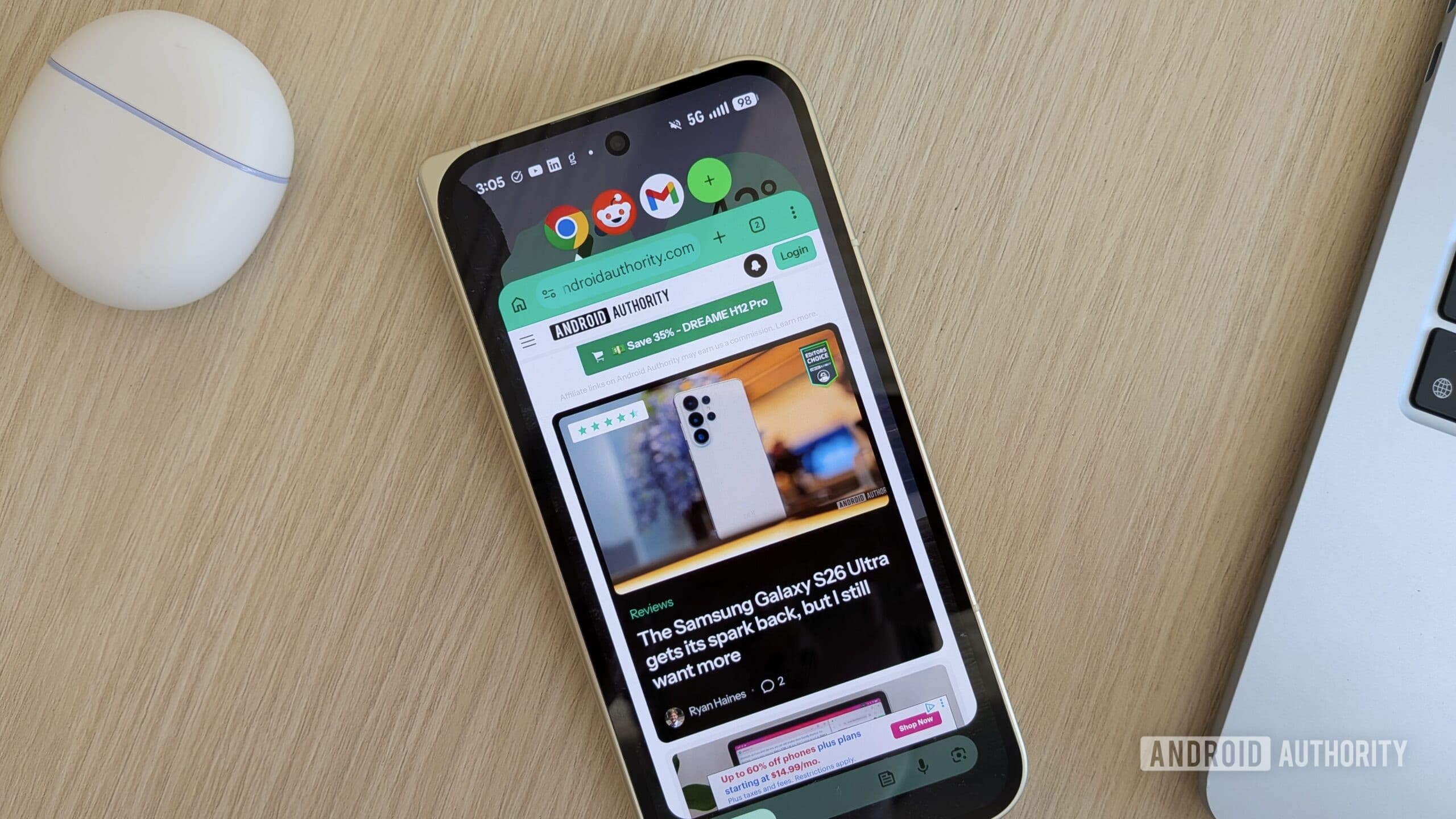
Android 17's Bubbles Feature Is Transforming Multitasking on Pixel Phones
If you have ever wished you could peek at a second app without completely abandoning what you were already doing on your phone, Google has finally delivered the answer. The June Pixel Drop has officially arrived, and among its most exciting additions is a multitasking feature called Bubbles. Available on all Pixel devices running Android 17, Bubbles is poised to change the way millions of users navigate their daily phone experience. Whether you are juggling messaging apps, checking quick references, or monitoring a live feed while browsing, Bubbles makes it all significantly more manageable.
What Exactly Is the Android 17 Bubbles Feature?
Bubbles is a new multitasking tool introduced in the June 2026 Pixel Drop that allows users to open apps in small, floating windows that hover over whatever content is currently displayed on screen. Think of it as having a sticky note that you can pin anywhere on your display — except instead of a note, it is a fully functional app.
The mechanic is elegantly simple. To activate Bubbles, you long-press any app icon on your home screen or app drawer. The selected app then launches in a compact floating window that sits on top of your current screen. When you are done interacting with it, simply tap anywhere outside the floating window and the app minimizes itself into a small circular bubble that rests along the edge of your display. Tap the bubble again whenever you need the app, and it expands back into the floating window instantly.
Even more impressive is the scale of this feature. Users can open up to five apps simultaneously as active Bubbles. That means you could theoretically have your messaging app, a calculator, a maps reference, a note-taking tool, and a news feed all floating and accessible at any given moment — without ever needing to fully switch away from your primary app.
Why Bubbles Is a Game-Changer for Android Multitasking
Android has long supported various forms of multitasking, from split-screen mode to picture-in-picture for video content. However, these solutions have always come with trade-offs. Split-screen mode divides your display and makes both apps smaller and sometimes harder to use. Picture-in-picture is limited specifically to media playback. Neither option offered a truly fluid, on-demand multitasking experience for general app usage.
Bubbles fills that gap in a way that feels genuinely intuitive. The floating windows are unobtrusive enough that they do not disrupt the main content you are interacting with, yet accessible enough that pulling up a secondary app takes just one tap. This is the kind of feature that, once you start using it, becomes very difficult to go without.
For professionals who rely on their Pixel phones throughout the workday, the use cases are immediately obvious. Imagine writing an email in Gmail while keeping a Bubble open with your calendar app for quick scheduling checks. Or browsing a recipe in Chrome while a Bubble with a unit converter floats nearby. The friction involved in context-switching — one of the most common sources of productivity loss on mobile devices — is dramatically reduced.
How to Use Bubbles on Your Pixel Phone
Getting started with Android 17's Bubbles feature is straightforward, and no complex setup is required. Here is how to make use of it right away:
- Ensure your device is updated: Bubbles is available on all Pixel phones running Android 17. Head to Settings, then System, then Software update to confirm you have the latest version installed via the June Pixel Drop.
- Long-press an app icon: From your home screen or app drawer, press and hold any app icon until the contextual menu appears.
- Select the Bubble option: You will see an option to open the app as a Bubble. Tap it, and the app launches in a floating window.
- Minimize to a Bubble: Tap anywhere outside the floating window to collapse it into a small circular Bubble on the edge of your screen.
- Manage multiple Bubbles: Repeat the process for additional apps. Remember, you can have up to five Bubbles active at one time.
- Close a Bubble: Drag the bubble downward toward a dismiss target at the bottom of the screen to close it entirely when you no longer need it.
Which Pixel Devices Support Android 17 Bubbles?
Google has confirmed that Bubbles is available across all Pixel devices that are capable of running Android 17. This broad rollout means that a wide range of users in the Pixel ecosystem — from those on the Pixel 6 series and beyond — should be able to take advantage of the feature following the June Pixel Drop update. If your device is compatible with Android 17, the Bubbles functionality will arrive as part of the same update package.
The Bigger Picture: Android 17 and the Future of Mobile Productivity
The introduction of Bubbles is not just a standalone feature — it reflects a broader direction that Google is taking with Android 17 and the Pixel line as a whole. The company has been steadily investing in making Pixel phones more capable productivity tools, and multitasking improvements are a central part of that strategy.
As smartphones continue to serve as primary computing devices for a growing portion of the global workforce, features like Bubbles become increasingly important. The ability to move fluidly between tasks without losing context or momentum is something users have long expected from desktop operating systems, and Android 17 is bringing that expectation closer to reality on mobile.
With the June Pixel Drop delivering Bubbles to the entire Pixel lineup, Google is sending a clear signal: the future of Android multitasking is flexible, fast, and user-first. If you have been looking for a reason to fully commit to the Pixel ecosystem, this might just be it.
Final Thoughts
Android 17's Bubbles feature is one of those updates that is easy to overlook in a list of patch notes but nearly impossible to stop using once you experience it firsthand. It solves a real, everyday problem in an elegant and accessible way, making multitasking on Pixel phones feel more natural than ever before. If you have not already updated to Android 17 via the June Pixel Drop, now is the perfect time to do so and see what your Pixel phone is truly capable of.