
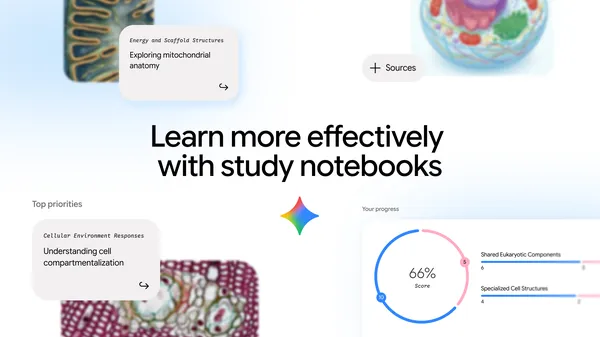
Introducing Study Notebooks: The AI-Powered Learning Tool Inside the Gemini App
Artificial intelligence is reshaping education at a remarkable pace, and Google's Gemini app is at the forefront of that transformation. One of its most exciting new features is Study Notebooks — a dedicated, interactive learning space built directly into the Gemini app. Designed with students of all levels in mind, Study Notebooks gives learners a smarter, more personalized way to engage with material, review concepts, and prepare for exams.
Whether you're a high school student tackling chemistry equations, a college sophomore juggling multiple courses, or a self-learner picking up a new skill, Study Notebooks can adapt to your goals. In this article, we'll walk you through five powerful ways you can use this feature to take your studying to the next level.
What Are Study Notebooks in the Gemini App?
Before diving into the five methods, it's worth understanding exactly what Study Notebooks is. Think of it as a smart, AI-enhanced notebook that lives inside the Gemini app. Rather than just being a static place to store notes, Study Notebooks functions as an interactive learning companion. You can feed it your study materials, ask it questions, request summaries, generate practice quizzes, and much more — all in one place.
Study Notebooks is tailored to serve individual student goals, meaning the experience isn't one-size-fits-all. It adapts based on what you're studying, how you're engaging with the content, and what you need help with most. This personalized approach is what sets it apart from traditional note-taking apps or generic AI chatbots.
1. Organize Your Study Material in One Central Space
One of the most immediate benefits of Study Notebooks is the ability to consolidate all of your study material in a single, organized location. Students often struggle with scattered notes — some in physical notebooks, some in Word documents, some in random apps. Study Notebooks solves this by giving you a dedicated space where everything related to a subject or topic can live together.
You can create individual notebooks for different courses or subjects, upload notes, paste in text from readings, and let Gemini help you organize it all logically. The AI can even help identify key themes and group related concepts, making it easier to navigate your material when exam week rolls around.
2. Generate Smart Summaries of Complex Topics
Struggling to make sense of a dense textbook chapter or a confusing lecture transcript? Study Notebooks can analyze the material you add and generate clear, concise summaries on demand. This is a game-changer for students who find themselves re-reading the same paragraphs repeatedly without absorbing the information.
Instead of spending an hour trying to digest a 30-page reading, you can let Gemini distill it down to the most important points in seconds. These AI-generated summaries are particularly useful for reviewing content quickly before a test or refreshing your memory days after an initial study session. You can also ask follow-up questions to go deeper on any point the summary raises.
3. Create Personalized Practice Quizzes and Flashcards
Active recall is one of the most effective study techniques backed by cognitive science, and Study Notebooks makes it easier than ever to practice it. Once you've loaded your material into a notebook, you can ask Gemini to generate practice quiz questions or flashcard-style prompts based on the content.
These aren't generic questions — they're drawn directly from the material you've been studying, which means they're highly relevant to what you actually need to know. You can request multiple-choice questions, short-answer prompts, fill-in-the-blank exercises, or conceptual questions that push you to think critically rather than just memorize. This targeted practice helps reinforce what you know and quickly reveals gaps in your understanding before they become a problem on test day.
4. Engage in Deep, Subject-Specific Conversations with Gemini
One feature that truly distinguishes Study Notebooks from a passive note-taking app is the ability to have real, substantive conversations with Gemini about your study material. You're not limited to reading static summaries or flipping through flashcards — you can ask nuanced questions, explore "what if" scenarios, request analogies that make difficult concepts click, or ask Gemini to explain something in a different way if the first explanation didn't land.
This conversational approach mirrors the experience of having a knowledgeable tutor available at any hour. Students who might feel hesitant to ask questions in class or during office hours often find it easier to explore their curiosity freely in this kind of interactive format. The more you engage, the more valuable the tool becomes as Gemini builds a clearer picture of what you're working toward.
5. Track Progress and Refine Your Learning Goals
Study Notebooks isn't just built for cramming — it's designed to support long-term, sustained learning. As you continue using the feature, you can revisit notebooks to see how your understanding has developed over time, update your notes as you learn more, and adjust the kinds of questions and summaries you request as your knowledge deepens.
This iterative approach encourages students to treat studying as an ongoing process rather than a last-minute sprint. You might start a notebook at the beginning of a semester with broad overviews and gradually fill it with more detailed, nuanced content as the course progresses. By the time final exams arrive, your notebook has effectively grown alongside your understanding of the subject.
Why Study Notebooks Is a Must-Have Tool for Modern Students
The integration of AI into education is no longer a distant concept — it's already here, and Study Notebooks in the Gemini app is one of the most accessible and thoughtfully designed examples of it. By combining organization, AI-generated summaries, personalized quizzes, interactive conversation, and long-term progress support all in one feature, Study Notebooks addresses the real challenges that students face every day.
Whether you're trying to stay on top of a heavy course load, prepare for a high-stakes exam, or simply deepen your understanding of a subject you're passionate about, Study Notebooks gives you the tools to study smarter — not just harder. If you haven't explored this feature yet, now is the perfect time to open the Gemini app and see what's possible.